|
Creating a new forum |

|

|

|

|
|
Creating a new forum |
|
|
|
|
The "pre-defined" forums need to be created before you publish them on the web site. Each forum must be created within some particular forum group. A forum group usually contains forums related to the same topic. For example:
| • | Computers (forum group) |
- Announcements (forum)
- Technical questions (forum)
- FAQ's (forum)
| • | Web design (forum group) |
- CSS (forum)
- XHTML (forum)
Creating a new forum group
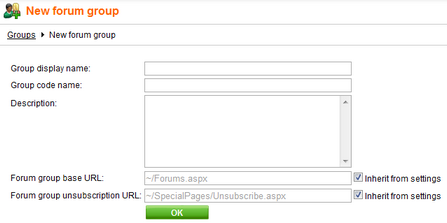
Go to CMS Desk -> Tools -> Forums and click New forum group. Enter for example:
| • | Group display name: the forum group name displayed on your web site |
| • | Group code name: the forum group name used in your code |
| • | Description: description of the forum group displayed on your web site |
| • | Forum group base URL: URL displayed when the user accesses the forum; eg. ~/MyForums.aspx |
| • | Forum group unsubscription URL: URL of a page where users can unsubscribe from the given forum group |
Click OK to save.
Creating a new forum
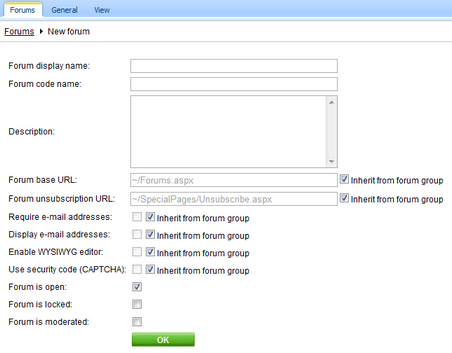
Go to CMS Desk -> Tools -> Forums and click Edit for some forum group. Go to the Forums tab and click Add forum. Enter for example:
| • | Forum display name: the name of the forum displayed on your web site |
| • | Forum code name: the name of the forum used in your code |
| • | Description: the description displayed on your web site |
| • | Forum base URL: URL displayed when the user accesses the forum; e.g. ~/MyForums.aspx |
| • | Forum unsubscription URL: URL of a page where users can unsubscribe from the given forum |
| • | Require e-mail address: indicates if e-mail address should be required from the post author |
| • | Display e-mail addresses: indicates if e-mail address of the post author should be displayed to other site visitors |
| • | Enable WYSIWYG editor: indicates if the visitors can use the WYSIWYG editor for entering text |
| • | Use security code (CAPTCHA): indicates if the user needs to retype the security code displayed as an image - this feature helps you avoid spam in the forums |
| • | Forum is open: indicates if the forum is visible and can be accessed |
| • | Forum is locked: if checked, new posts can't be added to the forum, while the forum is still accessible for viewing |
| • | Forum is moderated: indicates if the posts need to be approved by forum moderator |
Click OK to save.
Page url: http://devnet.kentico.com/docs/devguide/index.html?creating_a_new_forum.htm

