Content locking allows content editors to lock the document for editing so that the other editors cannot modify the document at the same time.
Content locking configuration
You can enable content locking for all versioned documents in Site Manager -> Settings -> Content management -> Use check-in/check out.
Example
Here's an example of operations in the document life cycle:
| 1. | User Alice creates a news item. The news item is automatically checked out (locked) for her. The other users cannot edit it. |
| 2. | User Alice finishes the changes and checks-in the document. |
| 3. | Now the other users can modify the document as well. As the document is checked in, Alice can also submit it to approval. |
When you try to edit a checked-in document, you will get a disabled editing form with Check out button:
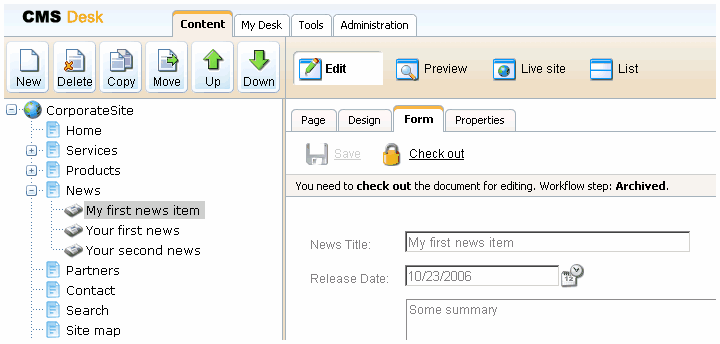
You can also use check-in/check-out buttons in Properties -> Versions dialog. This dialog allows you to specify custom version numbers and comments for each version when you check-in the document:
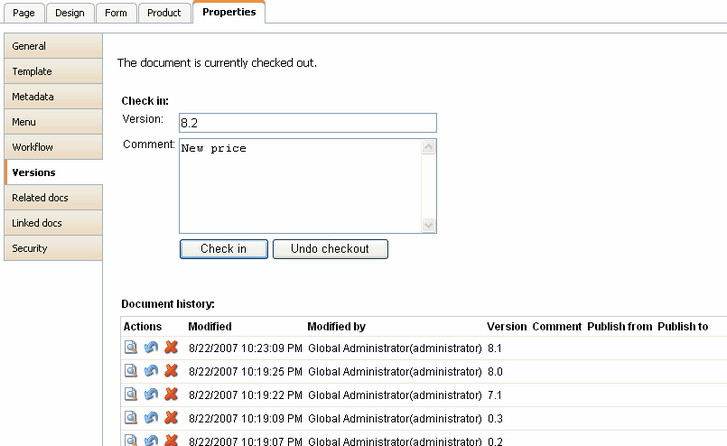
|
Checking-in any document
Users who are granted with permission "Check-in any document" can check-in any document even if he/she hasn't checked-out the document. This permission can be set in the Site Manager -> Administration -> Permissions section, in the permission matrix called Module: CMS Content. |
