In some cases, you may want to run multiple web sites in separate subfolders, without getting a new domain.
In this case, you can configure the domain names (or domain aliases) of the web sites like in the following example:
Example
1) Install Kentico cMS on the main domain and make sure the web site works correctly. Create another web site in the same installation. The following steps assume that your installation URL is http://localhost/mykenticoweb and the web site files are stored in folder C:\inetpub\wwwroot\mykenticoweb.
2) Configure web site 1 domain name as: localhost/mykenticoweb/web1
3) Configure web site 2 domain name as: localhost/mykenticoweb/web2
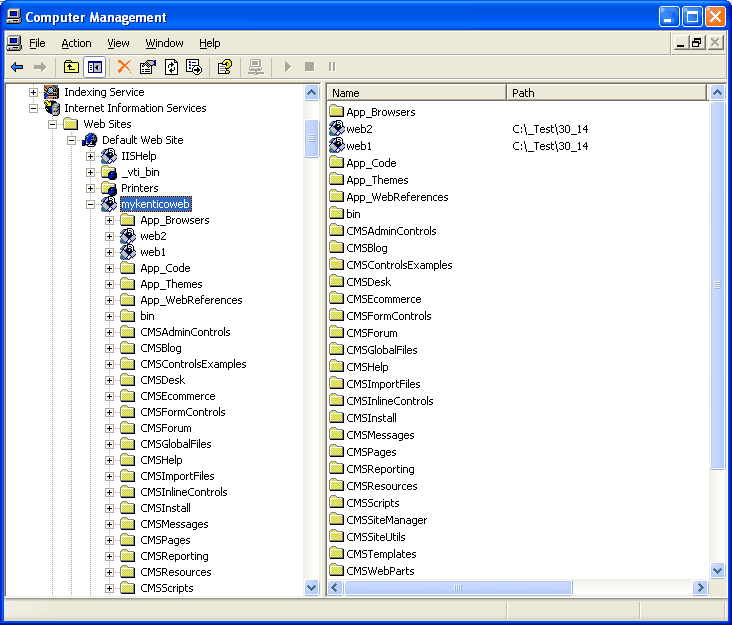
4) Open IIS console (Control Panels -> Administrative Tools -> Internet Information Services) and locate the web site and the virtual directory mykenticoweb.
5) Create two new virtual sub-directories under mykenticoweb called web1 and web2. Both of them will use the root of your mykenticoweb web site on the disk, which is C:\inetpub\wwwroot\mykenticoweb in this example.
Now when you go to http://localhost/mykenticoweb/web1, you will see web site 1. If you go to http://localhost/mykenticoweb/web1, you will see web site 2.
The following figure shows the configuration in the IIS console: