The process of scheduling includes two steps: writing code to perform required action and creating scheduled task.
Writing task code
Task code must be placed into a specific class method.
| 1. | Create a new library (assembly) as a part of your solution and a new class inside this library. The following example uses assembly name CMS.Ecommerce and class CMS.Ecommerce.ShoppingCartCleaner, however, you will need to use your own names. References to these dlls must be added to the newly created project: |
CMS.Scheduler.dll CMS.Staging.dll CMS.DataEngine.dll CMS.SettingsProvider.dll |
| 2. | Define method Execute(TaskInfo task) which will be performed when task is executed: |
[C#]
using CMS.Scheduler; namespace CMS.Ecommerce { /// <summary> /// Provides an ITask interface to delete old shopping carts. /// </summary> public class ShoppingCartCleaner : ITask { public string Execute(TaskInfo task) { try {
// Here comes the task code
return null; } catch (Exception ex) { return (ex.Message); } } } }
|
| 3. | Compile the library. |
Creating a new task
| 1. | Go to Site Manager -> Administration -> Scheduled tasks. |
| 2. | Select site the task should be scheduled for. |
| 3. | Click New task. |
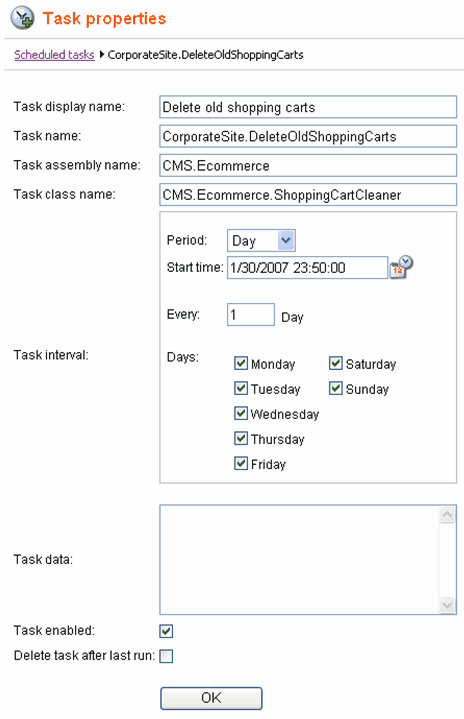
| 4. | Specify task properties. See example below. |
| 5. | Click OK. |
| 6. | The task is scheduled. |