Web parts represent a block of content or combination of content and functionality. They are the basic building block of page templates.
Web part is a user control (ASCX) that inherits from the CMSAbstractWebPart class. You can easily create your own web parts as described in chapter Developing web parts.
Web parts can be managed in Site Manager -> Development -> Web parts. Each web part has the following properties:
Web part display name |
The name of the site displayed to the users. |
Web part code name |
The name of the site used in the code. |
Web part category |
Here you can choose the category of the web part catalog where the web part is placed. |
Web part file name |
Contains a relative path to the user control that implements the web part. The path starts from the CMSWebParts folder. Example:
Search/cmscompletesearchdialog.ascx
It's recommended that you organize the web parts on the disk in the same way as in the categories. |
Web part description |
Description. |
On the Properties tab, you can define the web part properties and how they appear in the Web part properties editing form. Each web part must have at least the following property:
WebPartControlID |
ID of the web part on the page. |
It's also recommended that you use the following properties:
HideOnSubPages |
Indicates if the web part should be hidden on sub-pages. |
ContentBefore |
HTML content displayed before the web part. You can use it to display some header or add some encapsulating code, such as <div> or <table> element for required layout. |
ContentAfter |
HTML content displayed after the web part. You can use it to close the tags contained in the ContentBefore value, such as </div> or </table> element for required layout. |
Container |
Container (box) displayed around the web part. This value contains the code name of the container defined in Development -> Web part containers. See also: Containers overview |
ContainerTitle |
Container title displayed if you specify the container. |
The structure of the web part, content before/after and container is following:
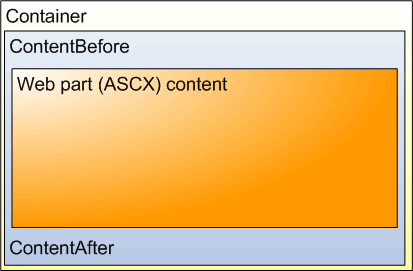
The containers, unlike the ContentBefore and ContentAfter sections, are re-usable and they can contain dynamically inserted values of web part properties.
|
Storing files related to web part
If your web part consists of several files (such as ASCX controls, images, js scripts, etc.), you should place these files in the subfolder under the folder where your main web part ASCX file is placed. If the name of the web part is MyWebPart.ascx, the subfolder name must be MyWebPart_Files. It will ensure that the additional files are exported/imported correctly when you move your web site or when you distribute the web part to other developers. |

Web part documentation
You can add your documentation to the web part on the Documentation tab. If you wish to document particular properties, you need to fill in the Field description on the Properties tab.
You can generate a complete web part documentation and print it by going to <web site URL>/CMSPages/documentation.aspx?generate=full in your browser. If you want to print it, it's recommended that you use FireFox for correct formatting and page breaking.