Global events allow you to execute custom events when some CMS event occurs. For example: if a document is created in the CMS system, you can handle this event, get information on the new document and send its content by e-mail or use third-party component to generate a PDF version of the document.
Events that can be handled
| • | Data updates - insert/update/delete actions for all data items |
| • | Security events - authentication and authorization |
| • | Document events - TreeNode insert/update/delete operations |
| • | Workflow events - document approval/rejection/publishing/archiving operations |
Similar topics: Writing custom search engine provider
|
Enabling custom event handling
If you want to use custom event handlers, make sure your web project's web.config file contains the following value:
<add key="CMSUseCustomHandlers" value="true" />
|

|
Default event handler library
The default event handler library is CMS.CustomEventHandler. Its name can be changed by means of a parameter in the AppSettings node of your project's web.config file. If the following line is inserted in the AppSettings node, the library name will be changed to CMS.CustomEventHandlerVB :
<add key="CMSCustomHandlersAssembly" value="CMS.CustomEventHandlerVB" /> |

How to write your own event handler
| 1. | Copy the CustomEventHandler project from Kentico CMS installation (typically C:\Program Files\KenticoCMS\2.x\CodeSamples\CustomEventHandler to some development folder (not under the web project). |
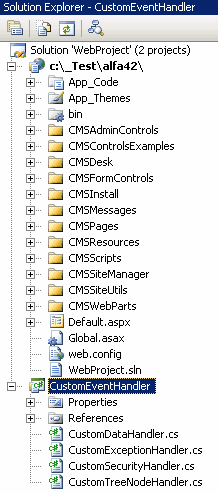
| 2. | Open the CMS web project using the WebProject.sln file. Click File -> Add -> Existing Project and select the CustomEventHandler.csproj file in the folder where you copied the CustomEventHandler project. Your Solution Explorer window will look like this: |
| 3. | Remove the invalid link to file CMS.pfx. Unfold the References section of the CustomEventHandler project and delete references to libraries CMSHelper and SiteProvider. |
| 4. | Now you need to update the references. Unfold the bin folder in the CMS web project and delete the standard CMS.CustomEventHandler.dll library. |
| 5. | Right-click the bin folder and choose Add Reference. Choose the Projects tab and click OK to add the CustomEventHandler project reference: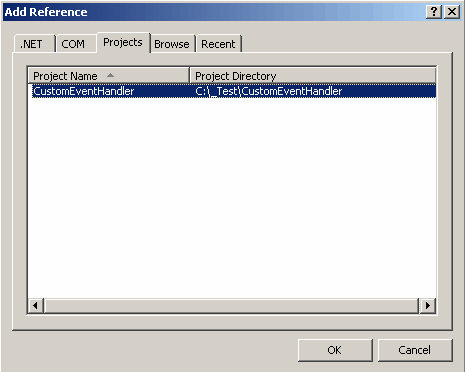 |
| 6. | Now right-click the CustomEventHandler project and choose Add Reference. Choose the Browse tab and locate the bin folder of your CMS web project on the disk. Choose to add a reference to the following libraries: - CMS.GlobalEventHelper.dll - CMS.TreeEngine.dll - CMS.GlobalHelper.dll - CMS.SiteProvider.dll - CMS.CMSHelper.dll - CMS.EmailEngine.dll - CMS.DateEngine.dll - CMS.WorkflowEngine.dll |
| 7. | Click Build -> Rebuild solution. |
Now you can modify the CustomEventHandler library source code and add your own code to handle appropriate actions. The places where you should place the code are marked with upper-case comments.
You can find more details on particular events in the following chapters.