The "pre-defined" forums need to be created before you publish them on the web site. Each forum must be created within some particular forum group. A forum group usually contains forums related to the same topic. For example:
| • | Computers (forum group) |
- Announcements (forum)
- Technical questions (forum)
- FAQ's (forum)
| • | Web design (forum group) |
- CSS (forum)
- XHTML (forum)
Creating a new forum group
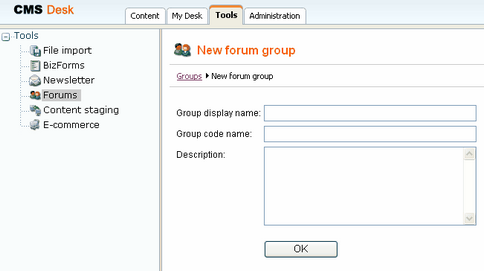
Go to CMS Desk -> Tools -> Forums and click Add forum group. Enter for example:
| • | Group display name: Computer forums - the name displayed on your web site |
| • | Group code name: Computers - the name used in your code |
| • | Description: Forums on computer hardware, desktops and notebooks - the description displayed on your web site |
Click OK to save.
Creating a new forum
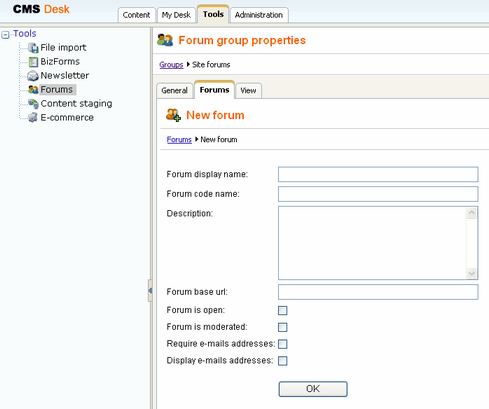
Go to CMS Desk -> Tools -> Forums and click Edit for some forum group. Go to the Forums tab and click Add forum. Enter for example:
| • | Forum display name: Announcements - the name displayed on your web site |
| • | Forum code name: Announcements - the name used in your code |
| • | Description: Announcements of new products - the description displayed on your web site |
| • | Forum base URL: http://localhost/kenticocms/forums.aspx - enter the full URL of the page with forum, including the domain |
| • | Is open: yes - indicates if the forum is open and new posts can be added |
| • | Is moderated: no - indicates if the posts need to be approved by forum moderator |
| • | Require e-mail address: no - indicates if e-mail address should be required from the post author |
| • | Display e-mail addresses: yes - indicates if e-mail address of the post author should be displayed to other site visitors |
| • | Enable WYSIWYG editor: yes - indicates if the visitors can use the WYSIWYG editor for entering text |
| • | Use security code (CAPTCHA): yes - indicates if the user needs to enter the security code displayed as an image - this feature helps you avoid spam in the forums. |
Click OK to save.