The process of scheduling includes two steps: writing code to perform required action and creating scheduled task
Writing task code
Task code must be placed into a specific class method.
| 1. | Create a new library (assembly) as a part of your solution and a new class inside this library. The following example uses assembly name CMS.Ecommerce and class CMS.Ecommerce.ShoppingCartCleaner, however, you will need to use your own names. |
| 2. | Define method Execute(TaskInfo task) which will be performed when task is executed: |
[C#]
namespace CMS.Ecommerce { /// <summary> /// Provides an ITask interface to delete old shopping carts. /// </summary> public class ShoppingCartCleaner : ITask { public string Execute(TaskInfo task) { try {
// Here comes the task code
return null; } catch (Exception ex) { return (ex.Message); } } } }
|
| 3. | Compile the library. |
Creating a new task
| 1. | Go to Site Manager -> Administration -> Scheduled tasks. |
| 2. | Select site the task should be scheduled for. |
| 3. | Click New task. |
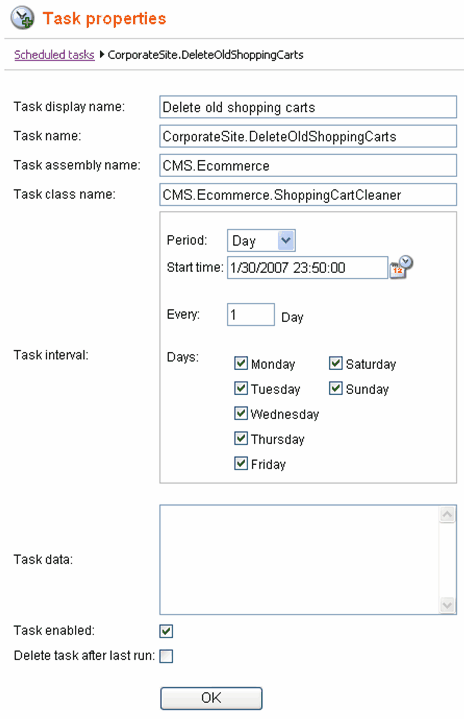
| 4. | Specify task properties. See example below. |
| 5. | Click OK. |
| 6. | The task is scheduled. |