What do I need?
| 1. | Kentico CMS 3.0 with built in PayPal support. |
| 2. | PayPal account, see https://www.paypal.com/us/cgi-bin/webscr?cmd=_registration-run for more details. |
PayPal settings in Kentico CMS 3.0
Before you can offer customers to use PayPal payment gateway you will need to do some necessary settings:
| 1. | Go to the section CMSSiteManager/Settings/Payment Gateways – PayPal |
| 2. | Enter Business (Email address for merchant's PayPal account) to identify your payments. Other settings are optional: |
| - | Notify Url: The URL to which PayPal posts information about the transaction, see PayPal IPN for more details. If set overrides settings in PayPal merchant's interface. |
| - | Cancel Return Url: The URL to which the buyer’s browser is redirected if payment is cancelled; for example, a URL on your website that displays a “Payment Canceled” page. Browser is redirected to a PayPal web page by default. |
| - | Return Url: The URL to which the buyer’s browser is redirected after completing the payment; for example, a URL on your site that displays a “Thank you for your payment” page. Buyer is redirected to a PayPal web page by default. |
| 3. | Ensure that PayPal payment method is registered and enabled. |
| 4. | Check PayPal payment method payment gateway settings: |
| ▪ | Payment gateway url: https://www.paypal.com/cgi-bin/webscr |
| ▪ | Payment gateway assembly name: CMS.EcommercerProvider |
| ▪ | Payment gateway class name: CMS.EcommercerProvider.CMSPayPalProvider |
Please note: If you want your transaction to be processed as test transaction use https://www.sandbox.paypal.com/cgi-bin/webscr as your payment gateway url and sign up for PayPal SandBox testing environment, see https://www.paypal.com/IntegrationCenter/ic_sandbox.html for more details.
How does it work?
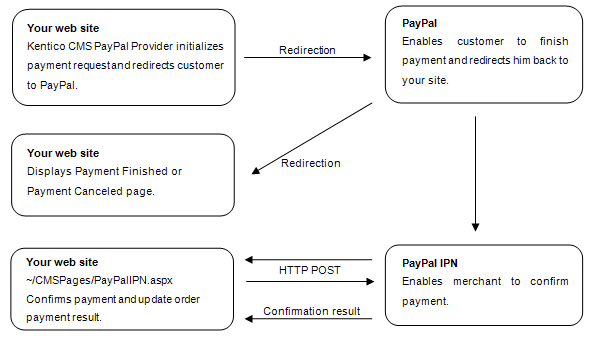
IPN - Instant Payment Notification
It’s easy to spoof the return URL you sent to PayPal since it’s visible on the query string. Therefore a user could simply type the Confirmation Url in directly and you should not confirm the order at this point. You can manually check for orders on the PayPal site or wait for PayPal’s confirmation emails etc. all of which let you know for sure that the order was processed in a ‘manual’ way.
To automate this process, PayPal can optionally ping you back at another URL with order completion information. It uses a mechanism called Instant Payment Notification (IPN) which is essentially a web based callback mechanism that calls a pre-configured url on your site. IPN must be enabled on the PayPal site and when enabled IPN sends a confirmation to you at this url after the order was processed. PayPal then expects a return from you within a certain timeframe (a few minutes) and return a response to you to confirm you that the customer has paid. To do this you have to POST the data back to PayPal by echoing back all the form data that PayPal sends to you. IPN is optional, but it’s a requirement if you need to confirm your orders immediately with your customers.