Dynamic newsletters contain content of the given page and they are sent out automatically on a regular basis, using the built-in scheduling system.
Go to CMS Desk -> Tools -> Newsletter and click New newsletter. Enter the following details:
| • | Newsletter display name: My dynamic newsletter |
| • | Newsletter name: MyDynamicNewsletter |
| • | Subscription confirmation: Subscription confirmation template |
| • | Unsubscription confirmation: Unsubscription confirmation template |
| • | Sender name: enter your full name |
| • | Sender e-mail: enter your e-mail address |
| • | choose Dynamic newsletter and enter the following details: - Source page URL: http://www.google.com - Schedule mail-outs: - Period: Minute - Start time: use the date-time picker to select the current date and time (Now) - Every: 1 minute - Between: 00:00 and 23:59 - Days: check all days |
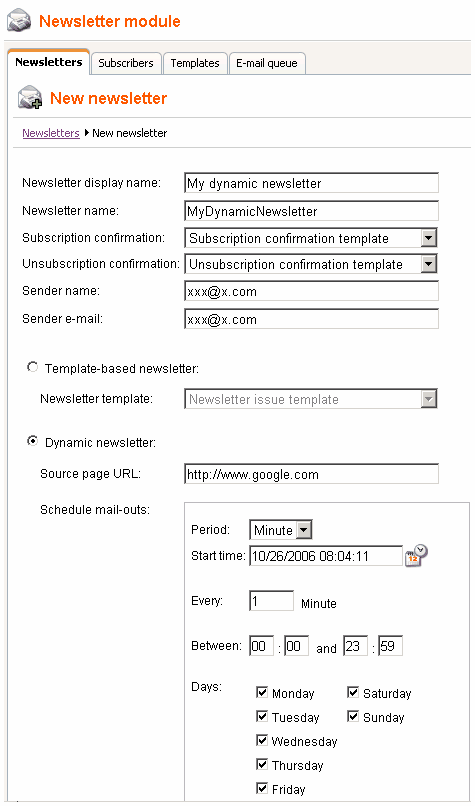
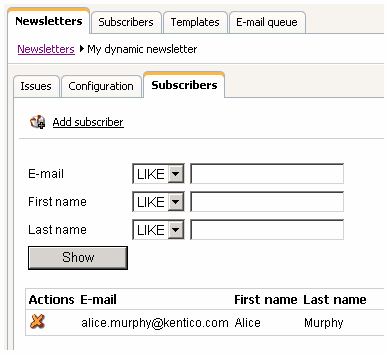
Click OK. Go to the Subscribers tab for this newsletter and add the previously created subscriber to this newsletter:
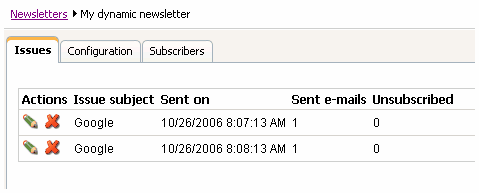
Go to the Issues tab. Here, you will see the list of sent issues. You may need to wait up to 2 minutes until the first issue is sent out. You can refresh the page by clicking the Issues tab again.
Check your mail box, you should receive the content of the given page by e-mail.
In this way, you can send out any page from your web site. You can create a new page only for the newsletter purposes that will display e.g. new articles added to your web site during the last month.
Blocking the dynamic newsletter mail-out
If you want to block the mail-out of the page (e.g. if there are no new articles), set the page title to ##DONOTSEND## and the newsletter will not be sent.