All changes made to the content are tracked in the database, in the synchronization log. You can review them in the CMS Desk –> Tools –> Content Staging -> Tasks dialog and select the tasks to synchronize.
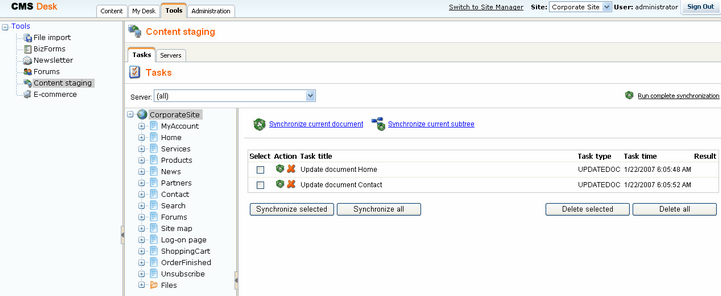
Choosing target servers to be synchronized
You can choose to synchronize only selected or all target servers using the drop-down list Server.
Running complete synchronization
When you click the Run complete synchronization button, all documents are synchronized to the target server(s). If you made any changes to content on the target servers in the meantime, they will be overwritten. Extra documents will not be deleted on the target server. This option synchronizes all documents even if there are no synchronization tasks listed.
Synchronizing current document or current sub-tree
This option synchronizes selected document/all documents in the sub-tree, even if there are no synchronization tasks listed.
Synchronizing selected documents
You can choose the documents to be synchronized using the check-boxes in the list and then click Synchronize selected or Synchronize all button.
Deleting synchronization tasks
If you do not wish to synchronize some changes, you can delete them using the Delete selected or Delete all buttons.
When the task fails
You can see the reason why some of the synchronization tasks failed by clicking the link Failed in the Result column.