Kentico CMS allows you to easily create secured web site areas that are accessible only by authenticated users. When an non-authenticated (public) user comes to the secured section, she is redirected to the logon form.
You can mark any section of the web site as a secured site area by setting the Requires authentication attribute on the Properties -> Security dialog to Yes. The value is automatically applied to all underlying pages, unless they have the attribute set to No.
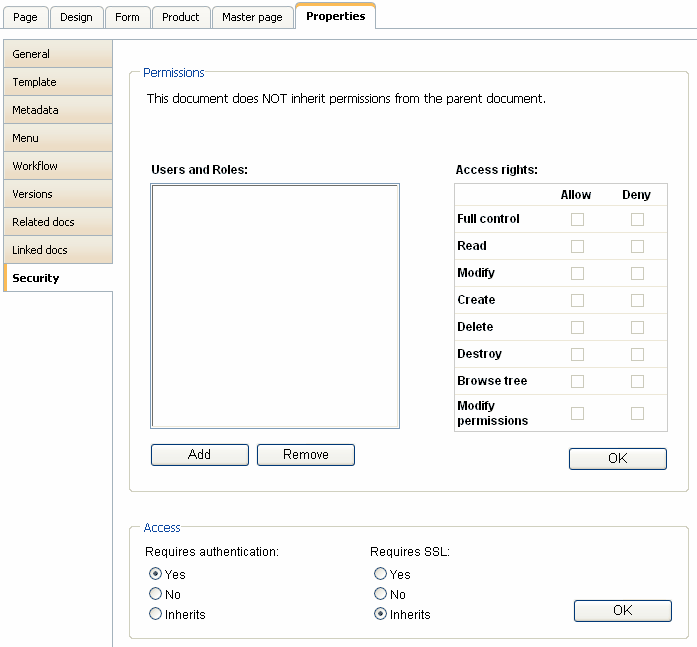
Configuration of a secured site area
This example explains how to secure the Products section in the sample Corporate Site.
| 1. | Sign in as administrator to CMS Desk. Go to the Content section and click the Products document in the content tree. |
| 2. | Click Properties -> Security. Set the value of the Requires authentication attribute to Yes and click OK. |
| 3. | Go to Site Manager -> Settings -> Security and choose the Corporate Site site in the drop-down list. Make sure the Secured areas logon page is set to ~/logon.aspx. This is the URL of the logon page. You can either use the system logon page ~/cmspages/logon.aspx or you can define your own as it's defined in the Corporate Site sample. |
| 4. | Go to CMS Desk -> Content, click the Log-on Page document and click Design. As you can see, the page is based on page template Log-on page with registration form that contains the Logon form web part and the Registration form web part.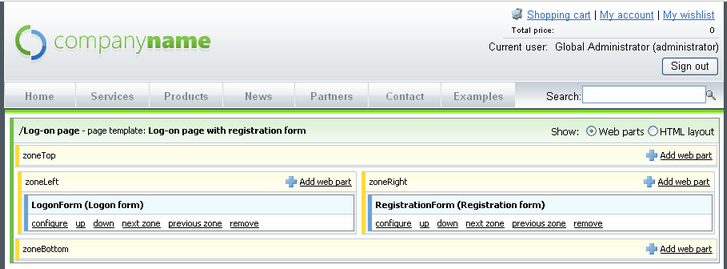 |
| 5. | Sign out and click Products in the main menu. You are redirected to the logon form: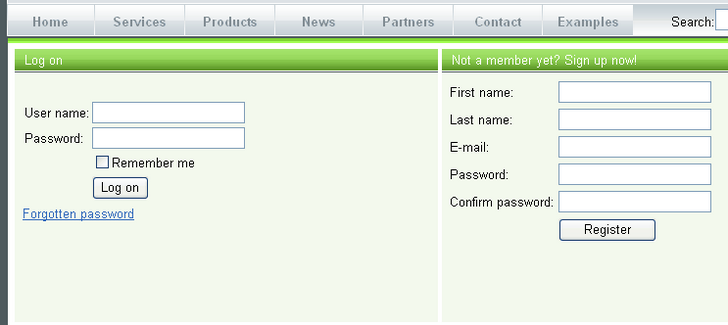 |
| 6. | Sign in as administrator and you will see the Products section. |