|
Creating a forum group |

|

|

|

|
|
Creating a forum group |
|
|
|
|
All forums are a part of some forum group. Pre-defined forums need to be created within some particular forum group and ad-hoc forums are automatically placed into the AdHoc forum group upon creation. A forum group usually contains forums related to the same topic. For example:
| • | Computers (forum group) |
| • | Announcements (forum) |
| • | Technical questions (forum) |
| • | FAQ's (forum) |
| • | Web design (forum group) |
| • | CSS (forum) |
| • | XHTML (forum) |
Creating a new forum group
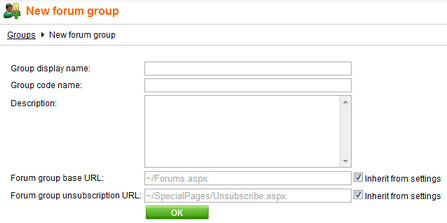
Go to CMS Desk -> Tools -> Forums and click  New forum group. Fill in the following fields:
| • | Group display name: the forum group name displayed on your website |
| • | Group code name: the forum group name used in your code |
| • | Description: description of the forum group displayed on your website |
| • | Forum group base URL: URL displayed when the user accesses the forum; eg. ~/MyForums.aspx |
| • | Forum group unsubscription URL: URL of a page where users can unsubscribe from the given forum group |
Click OK to save.
Continue to the Creating a pre-defined forum topic to learn how to create individual forums within a forum group or the Adding an ad-hoc forum to the web topic to find out more about ad-hoc forums..
Page url: http://devnet.kentico.com/docs/5_5r2/devguide/index.html?creating_a_forum_group.htm

