|
Settings |

|

|

|

|
|
Settings |
|
|
|
|
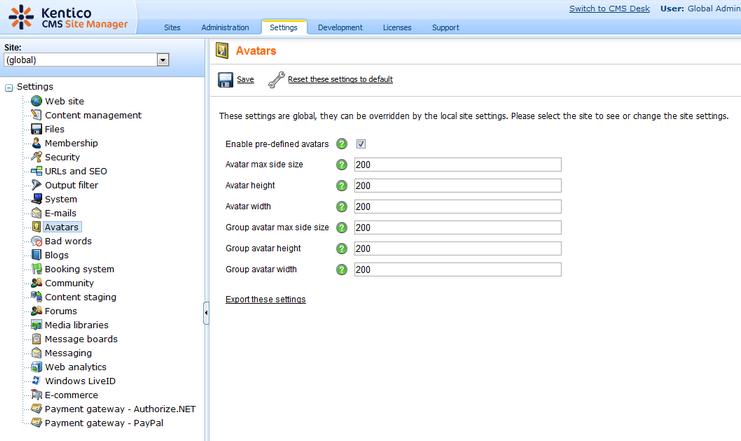
Settings of the Avatars module can be done in Site Manager -> Settings -> Avatars. The following settings are available:
| • | Enable pre-defined avatars - if checked, default avatars can be selected when selecting user's or group's avatar; if unchecked, only custom uploaded avatars can be used |
| • | Avatar max side size - maximal size of user avatars; if one or both sides of the image are longer, the image will be resized so that the longer side's size matches the entered value; if 0 is entered, 'Avatar height' and 'Avatar width' values will be used instead |
| • | Avatar height - if 'Avatar max side size' is set to 0, images will be resized to this height |
| • | Avatar width - if 'Avatar max side size' is set to 0, images will be resized to this width |
| • | Group avatar max side size - maximal size of group avatars; if one or both sides of the image are longer, the image will be resized so that the longer side's size matches the entered value; if 0 is entered, 'Group avatar height' and 'Group avatar width' values will be used instead |
| • | Group avatar height - if 'Group avatar max side size' is set to 0, images will be resized to this height |
| • | Group avatar width - if 'Group avatar max side size' is set to 0, images will be resized to this width |
Page url: http://devnet.kentico.com/docs/devguide/index.html?avatars_settings.htm

