|
Security |

|

|

|

|
|
Security |
|
|
|
|
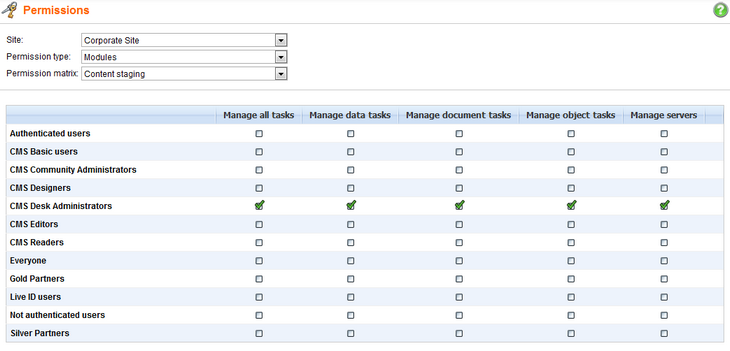
You can control the access to the Content staging module in Administration -> Permissions. You need to select:
| • | Site: your site |
| • | Permission type: Modules |
| • | Permission matrix: Content staging |
In the permission matrix, you can add the following permissions to the particular roles:
| • | Manage all tasks - displays the All tasks tab and allows synchronization and management of synchronization tasks on it |
| • | Manage data tasks - displays the Data tab and allows synchronization and management of synchronization tasks on it |
| • | Manage document tasks - displays the Objects tab and allows synchronization and management of synchronization tasks on it |
| • | Manage object tasks - displays the Objects tab and allows synchronization and management of synchronization tasks on it |
| • | Manage servers - allows members of the roles to manage target server configurations on the Servers tab |
Page url: http://devnet.kentico.com/docs/devguide/index.html?module_content_staging_security.htm

