This article explains how to fix the default CMS Desk Smart Search Results transformation.
When using the
CMS Desk -> Content Search feature along with any search index, you click on a search result link, but the link does not open the intended document.
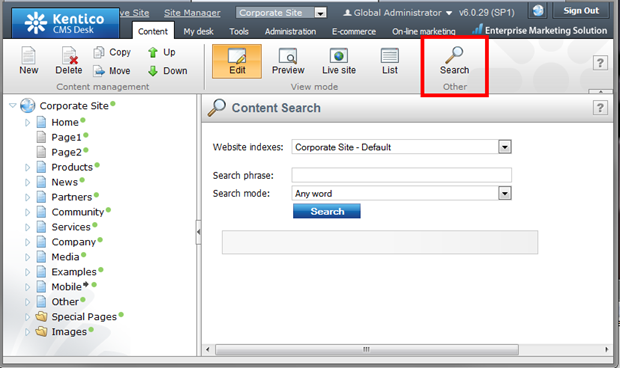
You will need to modify the
CMS Desk Smart Search Results transformation in order to correct this behavior. Please go to
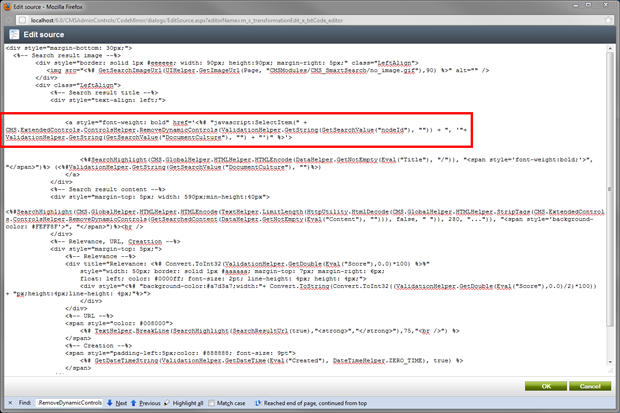
Site Manager -> Development -> Document types -> Root -> Transformations -> CMSDeskSmartSearchResults -> General and you should see the transformation that is used for this search result. You will need to change the single quotes to double quotes for the href tag, these are contained in the line below:
<a style="font-weight: bold" href='<%# "javascript:SelectItem(" + CMS.ExtendedControls.ControlsHelper.RemoveDynamicControls(ValidationHelper.GetString(GetSearchValue("nodeId"), "")) + ", '"+ ValidationHelper.GetString(GetSearchValue("DocumentCulture"), "") + "')" %>'>
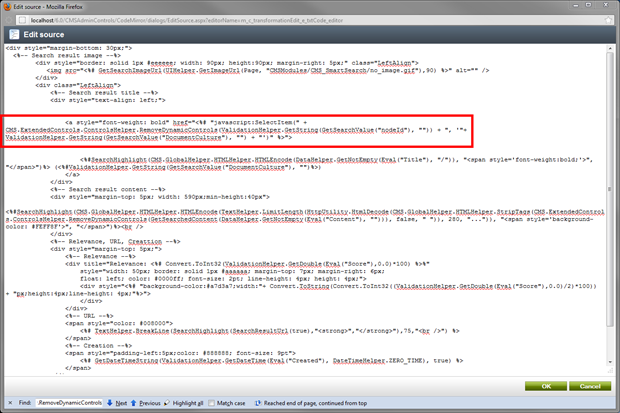
to:
<a style="font-weight: bold" href="<%# "javascript:SelectItem(" + CMS.ExtendedControls.ControlsHelper.RemoveDynamicControls(ValidationHelper.GetString(GetSearchValue("nodeId"), "")) + ", '"+ ValidationHelper.GetString(GetSearchValue("DocumentCulture"), "") + "')" %>">
After saving these changes, you can reload the CMS Desk Content Search window, and be able to open the search result links.
-eh-