1-2-3 Kentico CMS 6.0 Deployment and Maintenance
Version 6.0 brings huge improvements of Kentico deployment and maintenance. The current process of creating and maintaining Kentico instances remains, but we added several new features like new Kentico Installation Manager, silent install, improved upgrade process and more.
Kentico Installation Manager
Kentico Installation Manager (we call it KIM) is a brand new Windows Forms application for straightforward management of all Kentico instances.
Look at the following figure to see the new Kentico Installation Manager in an action. The screen shows management of several Kentico installations registered in KIM.
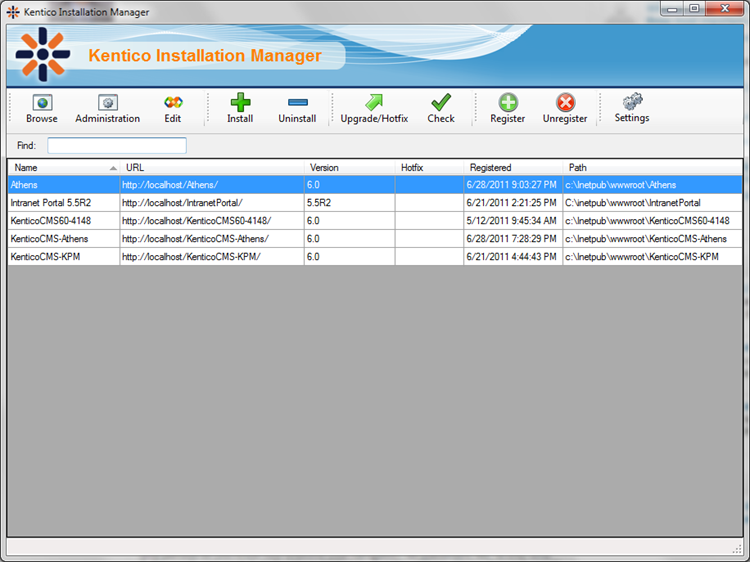
With KIM, you can:
- Browse – this option shows you the live site of the selected Kentico installation. If there is more than ONE live site, an additional dialog is shown.
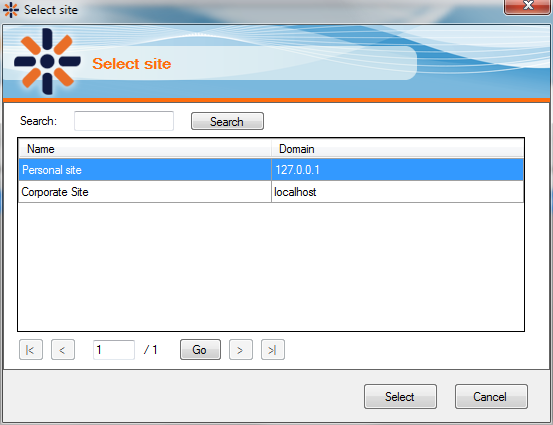
- Administration – opens Site Manager of the selected instance.
- Edit – opens the selected instance in Visual Studio.
- Install – starts new installation of Kentico CMS. This option starts a standard Kentico CMS Web Installer.
- Uninstall – uninstalls the selected instance.
- Upgrade/Hotfix – upgrades or applies hotfix on the selected instance.
- Check – checks if there are new upgrades/hotfixes on the Kentico server.
- Register/Unregister – registers/unregisters Kentico CMS in KIM. You can register an “unlimited” number of instances of different versions. E.g. the first screen on this page shows registered versions 5.5R2 and 6.0.
- Settings – settings of KIM itself, e.g. how often it should check for new upgrades/hotfixes.
And where do you find KIM?
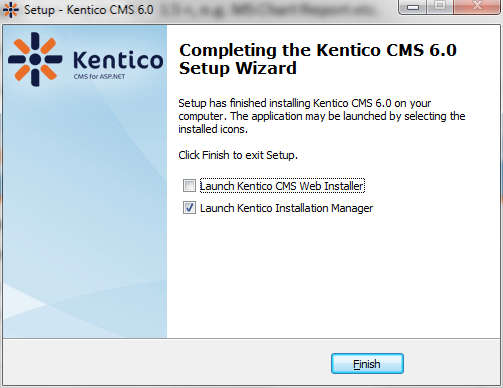
You can start KIM after the last step of Kentico CMS installation and it’s also available from the Windows Start menu.
Upgrades & Hotfixes
After the release of version 6.0, upgrade packages from version 5.5R2 and later from 5.5 and 5.0 will be available. These packages will be prepared for KIM, so it will be easier to upgrade an older version to the latest one using KIM.
The current upgrade/hotfix process will remain, so it’s up to you which approach you will prefer – KIM or standard.
Of course, these packages only update default Kentico code; your custom code must still be upgraded by your own means.
Kentico CMS Installation
The installation process of particular Kentico CMS instances also brings several new options.
As you can see below, .NET 2.0 is not supported anymore. The reason is quite simple: Kentico CMS 6.0 uses several technologies that require .NET 3.5 +, e.g. MS Chart Report etc.
Deployment to Windows Azure will also be easier in version 6.0 as it is supported by the Web Installer.
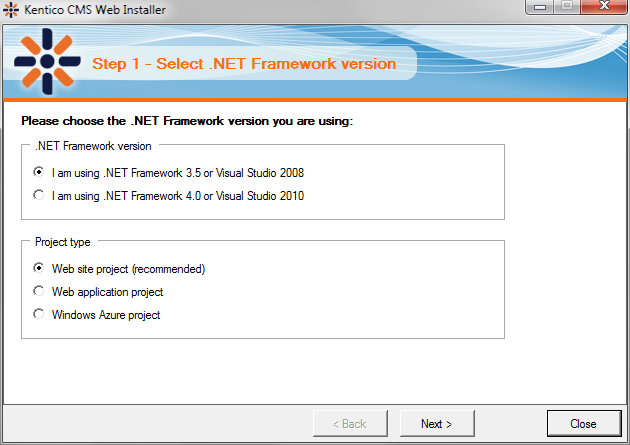
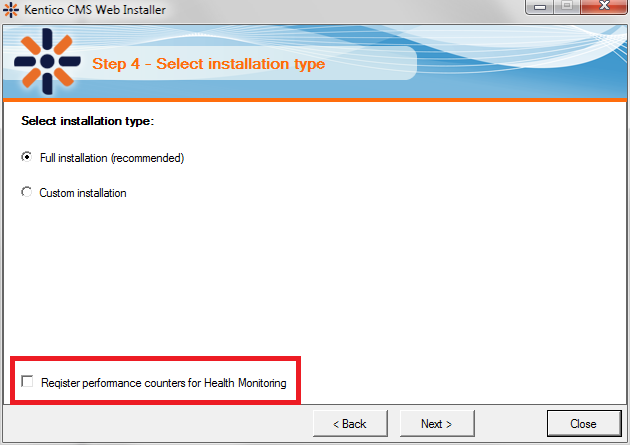
In Web Installer, you can also register Kentico performance counters for the Health Monitoring module. You can register/unregister them later via another admin tool.
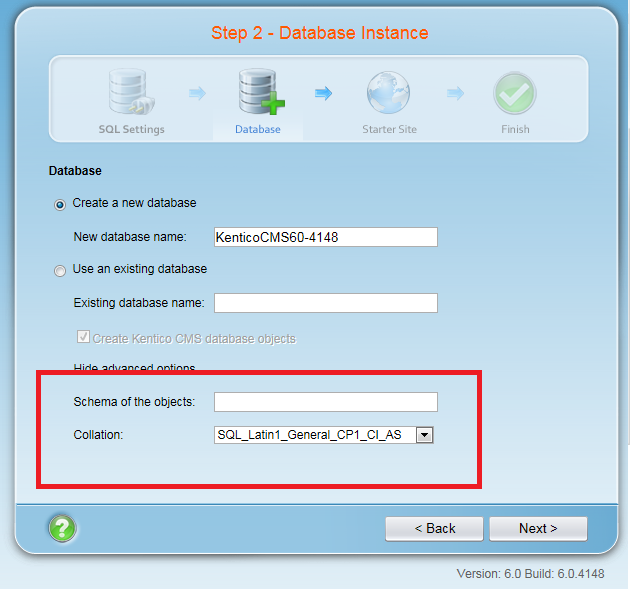
You can also set SQL Collation for the database and schema name of objects that will be created.
Easy Navigation to Websites
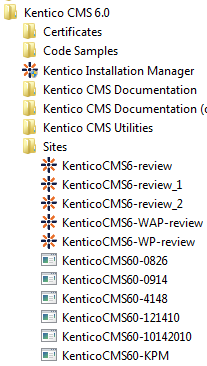
Every time you start web installation via KIM or Web Installer itself, the created website is registered in KIM and in Windows Start menu. As you can see in the next figure, all created Kentico CMS based websites are accessible directly from the Start menu.
Silent Install
Despite the fact KIM is cool itself, there is another feature I like even more. It’s Silent Install of Kentico CMS aka Installation of Kentico CMS from the command line.
We developed a special command line tool called SilentInstall.exe using which you can silently install the whole Kentico CMS, including database setup, import of websites, turning on/off features, etc. The usage of this tool is pretty easy:
silentinstall.exe <<installation_config_file.xml>>
The .XML configuration file contains all necessary setup information. Below, you can see an example of such a configuration XML file.
<SilentInstall ShowProgress="COMMAND_PROMPT" Log="TRUE" OnError="CONTINUE" LogFile="{%programfiles%}\KenticoCMS\KenticoCMS_{%shortversion%}\setup.log" CheckRequirements="TRUE" >
<Setup NET="3.5" SetupFolder="{%programfiles%}\KenticoCMS\KenticoCMS_{%shortversion%}" InstallContextHelp="TRUE" OpenAfterInstall="TRUE" WebProject="FALSE" HealthMonitoring="TRUE" />
<IIS AppPool="Native" Website="Default Web Site" Location="LOCAL" TargetFolder="c:\Inetpub\wwwroot\KenticoCMS_{%shortversion%}" RootFolder="FALSE" />
<Sql SqlPswd="" Database="{%username%}_{%shortversion%}" Operation="NEW" SqlName="" Server="" Authentication="SQL" />
<Notification Enabled="TRUE" Server="" From="test@test.tt" To="" Subject="" UserName="" Password="" SSL="FALSE" AttachLogFile="TRUE" />
<WebTemplates type="Mix">
<WebTemplate name="BlankSite" operation="Add" />
<WebTemplate name="CorporateSite" operation="Remove" />
</WebTemplates>
<UICultures type="Mix">
<UICulture name="english" operation="Add" />
<UICulture name="cs-cz" operation="Add" />
</UICultures>
<Modules type="Mix">
<Module name="BizForms" operation="Add" />
<Module name="Blogs" operation="Remove" />
<Module name="Staging" operation="Add" />
<Module name="Sharepoint" operation="Add" />
</Modules>
<Dictionaries type="Mix">
<Dictionary name="english" operation="Add" />
<Dictionary name="cs-cz" operation="Add" />
<Dictionary name="de-de" operation="Add" />
<Dictionary name="en-au" operation="Remove" />
</Dictionaries>
<WebSites>
<WebSite domain="localhost" displayname="Corporate site" codename="CorpSite" webtemplatename="CorporateSite" runsite="TRUE"/>
<WebSite domain="localhost" displayname="Intranet site" codename="IntranetSite" webtemplatename="IntranetSite" runsite="FALSE" />
</WebSites>
<Licenses>
<License domain="localhost">
<![CDATA[DOMAIN:localhost
PRODUCT:CF05
EXPIRATION:00000000
PACKAGES:
SERVERS:1
NMihK+Gvx0l6fusL53tRFo8TM1MYw0dQvbNjZnVfx2GaMQrrNcMwHwk15ljrhgnt4ZQSoABtw0lRG4yTaK2MoXHJ5gUgGpWs1GIIaUknt8sS9DVKw== ]]>
</License>
</Licenses>
</SilentInstall>
You can also use a few macros inside the .XML file like {%shortversion %}, {%username%}, etc.
I think it’s not necessary to describe all XML elements of the configuration file as they are clear J Detailed documentation will be included with the tool.
So, it’s all about new Deployment and Maintenance features in version 6.0. Which one will be your favourite?