New and Free in the Marketplace: HTML2Kentico
Utility that allows you to import static HTML pages into your Kentico CMS website.
The
HTML2Kentico tool is an independent Windows application that allows static HTML website to be converted into Kentico CMS. It was developed by Robert Stebel, Junior Developer at Kentico, and is offered free in the
Kentico Marketplace.
The application uses REST to communicate with the target Kentico CMS instance, so no special modification of the CMS system is required. However, this also means that the application will only work for Kentico CMS version 6.0 or newer, where REST is supported. Additionally, the HTML pages that you wish to import must be structured into DIV elements with specified ID attributes. Hundreds of suitable templates can be found at
http://www.freecsstemplates.org/.
How it works
The input used by the tool is a ZIP archive or folder containing the HTML pages and other files that make up the static website.
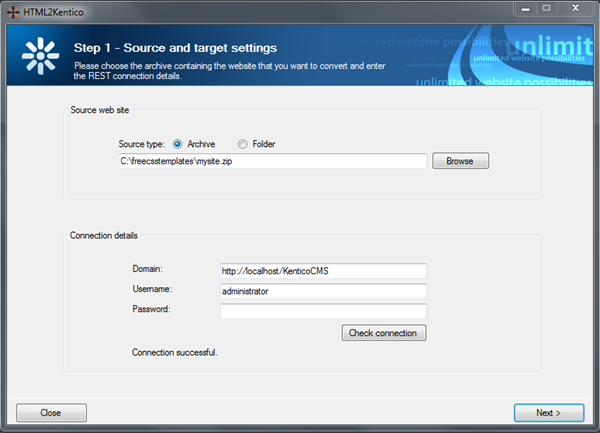
Before the start of the conversion process, one of the HTML pages and a specific DIV element in its content must be selected. This page will then be used as the source for the Root (master page) of the website in Kentico CMS. Also, the target site for import must be selected. It is recommended to create a new site based on the Blank Site web template for this purpose.
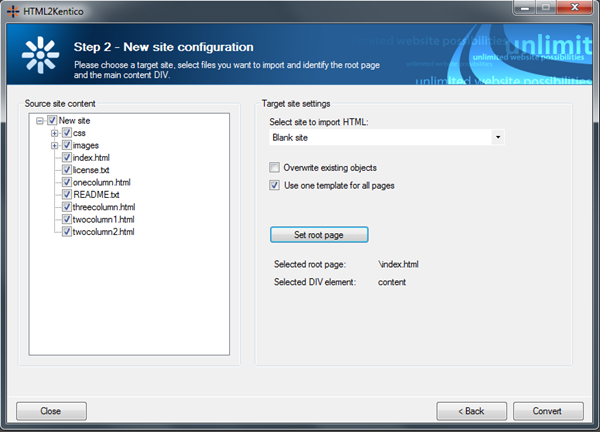
Now, the content of the root page is created in the following way:
-
The selected DIV element is replaced by a Page placeholder web part.
-
Every other DIV on the selected page is converted into a separate zone containing an Editable text web part with the same content.
During the conversion, files are handled depending on whether they are folders, HTML pages, CSS stylesheets or other formats:
-
The HTML pages are converted into CMS.MenuItem documents and are added to the content tree. Page templates are also created and assigned to these pages.
-
Folders become CMS.Folder documents in the content tree, so the structure of the website remains the same.
-
For CSS files, matching stylesheet objects are created in the system (in Site Manager -> Development -> CSS stylesheets).
-
Other types of files (images, text documents etc.) are saved as CMS.Attachment objects and added to the site’s content tree through CMS.File documents.
More detailed info can be found in the Instructions.pdf file attached in the package with the application. To download the package, please visit
Kentico Marketplace.